viernes, 23 de diciembre de 2016

Oracle Data Pump

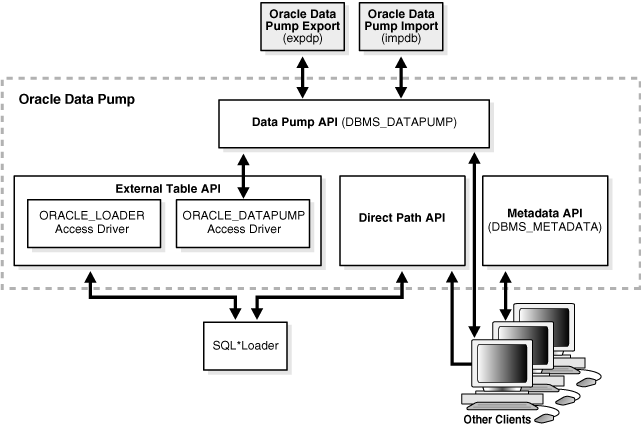
Oracle Data Pump is made up of three distinct parts:

  • The command-line clients, expdp and impdp
  • The DBMS_DATAPUMP PL/SQL package (also known as the Data Pump API)
  • The DBMS_METADATA PL/SQL package (also known as the Metadata API)

The Data Pump clients, EXPDP and IMPDP, invoke the Data Pump Export utility and Data Pump Import utility, respectively.

The expdp and impdp clients use the procedures provided in the DBMS_DATAPUMP PL/SQL package to execute export and import commands, using the parameters entered at the command line. These parameters enable the exporting and importing of data and metadata for a complete database or for subsets of a database.

When metadata is moved, Data Pump uses functionality provided by the DBMS_METADATA PL/SQL package. The DBMS_METADATA package provides a centralized facility for the extraction, manipulation, and re-creation of dictionary metadata.

The DBMS_DATAPUMP and DBMS_METADATA PL/SQL packages can be used independently of the Data Pump clients.

The users that perform the operations of (EXPDP and IMPDP) just need the following privileges:

  • CREATE OR REPLACE DIRECTORY test_dir AS '/u01/app/oracle/oradata/';
  • GRANT READ, WRITE ON DIRECTORY test_dir TO scott;
  • GRANT EXP_FULL_DATABASE TO SCOTT
  • GRANT IMP_FULL_DATABASE TO SCOTT
  • OPTION E (INCORRECT)
The EXPDP and IMPDP clients use the procedures provided in the DBMS_DATAPUMP PL/SQL package to execute export and import commands.

Table Exports/Imports

The TABLES parameter is used to specify the tables that are to be exported. The following is an example of the table export and import syntax.
  • expdp scott/tiger@db10g tables=EMP,DEPT directory=TEST_DIR dumpfile=EMP_DEPT.dmp logfile=expdpEMP_DEPT.log
  • impdp scott/tiger@db10g tables=EMP,DEPT directory=TEST_DIR dumpfile=EMP_DEPT.dmp logfile=impdpEMP_DEPT.log
The TABLE_EXISTS_ACTION=APPEND parameter allows data to be imported into existing tables.

Schema Exports/Imports

The OWNER parameter of exp has been replaced by the SCHEMAS parameter which is used to specify the schemas to be exported. The following is an example of the schema export and import syntax.
  • expdp scott/tiger@db10g schemas=SCOTT directory=TEST_DIR dumpfile=SCOTT.dmp logfile=expdpSCOTT.log
  • impdp scott/tiger@db10g schemas=SCOTT directory=TEST_DIR dumpfile=SCOTT.dmp logfile=impdpSCOTT.log

Database Exports/Imports

The FULL parameter indicates that a complete database export is required. The following is an example of the full database export and import syntax.
  • expdp system/password@db10g full=Y directory=TEST_DIR dumpfile=DB10G.dmp logfile=expdpDB10G.log
  • impdp system/password@db10g full=Y directory=TEST_DIR dumpfile=DB10G.dmp logfile=impdpDB10G.log
Resultado de imagen para Oracle Data Pump

miércoles, 21 de diciembre de 2016

RMAN Data Recovery Advisor (DRA)

Purpose of Data Recovery Advisor

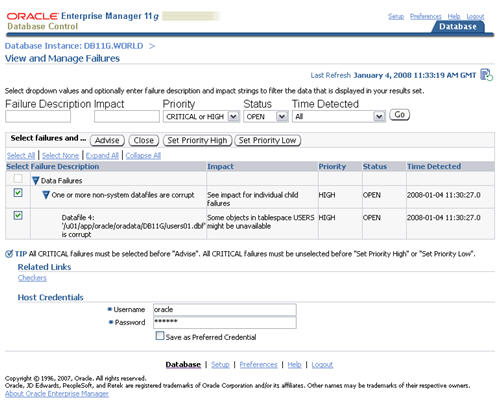
Automatically diagnoses data failures, determines and presents appropriate repair options, and executes repairs at the user's request. 

In this context, a data failure is a corruption or loss of persistent data on disk. By providing a centralized tool for automated data repair, Data Recovery Advisor improves the manageability and reliability of an Oracle database and thus helps reduce the MTTR.

Data Recovery Advisor provides the following advantages over traditional repair techniques:

  • Data Recovery Advisor can potentially detect, analyze, and repair data failures before a database process discovers the corruption and signals an error. Early warnings help limit damage caused by corruption.
  • Manually assessing symptoms of data failures and correlating them into a problem statement can be complex, error-prone, and time-consuming. Data Recovery Advisor automatically diagnoses failures, assesses their impact, and reports these findings to the user.
  • Execution of a data repair can be complex and error-prone. If you choose an automated repair option, then Data Recovery Advisor executes the repair and verifies its success.


In the RMAN command-line interface, the Data Recovery Advisor commands are LIST FAILURE, ADVISE FAILURE, REPAIR FAILURE, and CHANGE FAILURE:


  • The LIST FAILURE command displays any failures with a status OPEN and a priority of CRITICAL or HIGH in order of importance. If no such failures exist it will list LOW priority failures.
    • LIST FAILURE;
  • The ADVISE FAILURE command, as the name implies, provides repair advice for failures listed by the LIST FAILURE command, as well as closing all open failures that are already repaired.
    • ADVISE FAILURE;
  • The REPAIR FAILURE command applies the repair scripts produced by the ADVISE FAILURE command. Using the PREVIEW option lists the contents of the repair script without applying it.
    • REPAIR FAILURE PREVIEW;
    • By default, the REPAIR FAILURE command prompts the user to confirm the repair, but this can be prevented using the NOPROMPT keyword.
      • REPAIR FAILURE NOPROMPT;
  • The CHANGE FAILURE command allows you to change the priority of a failure or close an open failure. You may wish to change the priority of a failure if it does not represent a problem to you. For example, a failure associated with a tablespace you know longer use may be listed as a high priority, when in fact it has no effect on the normal running of your system.
    • RMAN> CHANGE FAILURE 202 PRIORITY LOW;

Resultado de imagen para RMAN Data Recovery Advisor (DRA)

lunes, 19 de diciembre de 2016

SET_TABLE_PREFS Procedure

Starting in 11g, there are three new arguments to the SET_TABLE_PREFS procedure, designed to allow the DBA more control over the freshness of their statistics:

  • STALE_PERCENT - overrides the one-size-fits-all value of 10%.
  • INCREMENTAL - Incremental statistics gathering for partition.
  • PUBLISH - Allows the DBA to test new statistics before publishing them to the data dictionary.

This is an important 11g new feature because the DBA can now control the quality of optimizer statistics at the table level, thereby improving the behavior of the SQL optimizer to always choose the "best" execution plan for any query.

DBMS_STATS.SET_TABLE_PREFS

Oracle also has a feature ("PUBLISH, false") feature in DBMS_STATS.SET TABLE_PREFS that allows you to collect CBO statistics and use them for testing without "publishing" them into the production environment.

For example:

You can change the PUBLISH setting for the customers table in the SH schema, execute the statement:

EXEC DBMS_STATS.SET_TABLE_PREFS('SH', 'CUSTOMERS', 'PUBLISH', 'FALSE');

When Oracle automatically enables statistics collection, the default "staleness" threshold of 10% can now be changed with the DBMS_STATS.SET_TABLE_PREFS procedure:

EXEC DBMS_STATS.SET_TABLE_PREFS('HR', EMPS', 'STALE_PERCENT', '15%')

You can also expand upon this functionality at greater levels of breadth using these news procedures:

  • DBMS_STATS.SET_SCHEMA_PREFS - This is like RUNNINGSET_TABLE_PREFS, but for all objects in the schema
  • DBMS_STATS.SET_DATABASE_PREFS - This runs the SET_TABLE_PREFS for all of the schemas in the current database.
  • DBMS_STATS.SET_GLOBAL_PREFS - This runs SET_TABLE_PREFS for all databases in the environment.

Resultado de imagen para oracle SET_TABLE_PREFS

domingo, 18 de diciembre de 2016

Definer's Rights & Invoker's Right


Managing Security

You can control access to privileges that are necessary to run user-created procedures by using definer's rights, which execute with the privileges of the owner, or with invoker's rights, which execute with the privileges of the user running the procedure.

  • In a definer's rights procedure, the procedure executes with the privileges of the owner. The privileges are bound to the schema in which they were created.
 Description of Figure 5-3 follows
  • An invoker's rights procedure executes with the privileges of the current user, that is, the user who invokes the procedure.
Description of Figure 5-2 follows

For example:
Suppose user bixby creates a procedure that is designed to modify table cust_records and then he grants the EXECUTE privilege on this procedure to user rlayton. If bixby had created the procedure with definer's rights, then the procedure would look for table cust_records in bixby's schema. Had the procedure been created with invoker's rights, then when rlayton runs it, the procedure would look for table cust_records in rlayton's schema.

By default, all procedures are considered definer's rights. You can designate a procedure to be an invoker's rights procedure by using the AUTHID CURRENT_USER clause when you create or modify it, or you can use the AUTHID DEFINER clause to make it a definer's rights procedure.

sábado, 17 de diciembre de 2016

Avoid Frequent Checkpoints

A frequent checkpoints degraded the perform of the database, but what can we do to solve it?

  • Check the size of the redo log file size and increase the size if it is small.
  • Set the FAST_START_MTTR_TARGET parameter as per the advice given by the MTTR Advisor.

Increase the size of the redo log:

The size of the redo log files can influence performance, because the behavior of the database writer and archiver processes depend on the redo log sizes.

Generally, larger redo log files provide better performance, however it must balanced out with the expected recovery time. Undersized log files increase checkpoint activity and increase CPU usage.


MTTR Advisor:

SELECT * FROM V$MTTR_TARGET_ADVICE;

The Estimated MTTR Oracle metric is the current estimated mean time to recover (MTTR) in the number of seconds based on the number of dirty buffers and log blocks.

The MTTR was developed to measure the amount of downtime that will be incurred should there be a catastrophic failure of some component within the computer system. Of course, for continuously available systems the MTTR should be equal to zero.

Whenever you set fast_start_mttr_target to a nonzero value, and while MTTR advisory is ON, Oracle Corporation recommends that you disable (set to 0) the following parameters:

LOG_CHECKPOINT_TIMEOUT
LOG_CHECKPOINT_INTERVAL
FAST_START_IO_TARGET

Enabling MTTR Advisory 

Enabling MTTR Advisory involves setting two parameters:

alter system SET STATISTICS_LEVEL=TYPICAL SCOPE=BOTH;
alter system SET FAST_START_MTTR_TARGET > 0 SCOPE=BOTH;

Resultado de imagen para oracle checkpoints


martes, 27 de octubre de 2015

Oracle Core


The Core of an Oracle Database


There are three major structures on an Oracle Database server:


  • Storage Structures.
  • Memory Structures.
  • Process Structures.
A basic system of Oracle databases consists of a database and a database instance.


The database (physical storage)


It consists of two independent physical and logical structures. Because they are independent, the physical storage of data can be managed without affecting access to logical storage structures.

The instance (memory and processes)

It consists of memory structures and background processes. Each time an instance is started, a shared memory area called the global system area (SGA) is mapped and the background processes are started. After starting an instance, it is associated with a specific database. This is called database assembly. The database is then ready to be opened and thus accessible to authorized users.

Private Memory Zone

The PGA (Program Global Area) is the private memory zone of each Oracle process, where the information it contains is basically about the session (which user is connected, privileges, cursors are open, ordering buffer).


lunes, 8 de septiembre de 2014

Enable Oracle ARCHIVELOG mode


What is Oracle's ArchiveLog mode


Oracle writes to online rebuild log files (redo log online) in a cyclic manner, Oracle saves all the transactions that are being performed in these redo log files online. It starts writing to the first redo log file online, when it fills it passes to the second, and so on until the last redo log file online, when it fills the last one it initiates a process in the background called LGWR (Log Writer) to overwrite The contents of the first redo log file online and start over. When Oracle runs in ARCHIVELOG mode the background process called ARCH makes a copy of each redo log file online once the LGWR process finishes writing to it, it saves that copy to the offline rebuild files (redo log Offline) to disk:


Before proceeding, we can see whether or not the Archive mode is active with the command SQL> ARCHIVE LOG LIST from SqlPlus.


Define the path where the copy of the Redo Logs will be created

We have to define the path in the parameter log_archive_dest_1 as follows from SqlPlus with the user sys:

SQL> ALTER SYSTEM SET log_archive_dest_1='LOCATION=/U/oradata/PRUEBA/archive' SCOPE=SPFILE;


Format the name of the files to back up

For this we use the parameter log_archive_format as shown below from SqlPlus with the user sys:

SQL> ALTER SYSTEM SET log_archive_format='PRUEBA_%s.arc' SCOPE=SPFILE

Where TEST is the name of the database,% s is the log sequence number and arc is the extension that indicates that it is an archive (archived)

To enable ArchiveLog mode (as a DBA user)

  1. You need to shut down the SQL database> SHUTDOWN IMMEDIATE ;
  2. After that it is mounted under SQL> STARTUP MOUNT ;
  3. We execute the following SQL command> ALTER DATABASE ARCHIVELOG ;
  4. Finally we open the SQL database> ALTER DATABASE OPEN ;
Note: If we want to deactivate the ArchiveLog mode we do the same steps as above but only change step 3 by the  SQL> ALTER DATABASE NOARCHIVELOG;